Free Wix alternative for forms and workflow automation
Build advanced forms, order flows, appointment requests, surveys and approvals—or add them to the Wix website you already have—without forcing every process into a basic contact form.

Is AbcSubmit a complete replacement for Wix?
Not for every project—and that is the useful place to start. Wix is a broad website platform for business sites, blogs, portfolios, ecommerce, scheduling and marketing. AbcSubmit specializes in forms and the processes connected to them: structured data collection, conditional logic, payments, appointments, PDFs, approvals, notifications and integrations.
Choose AbcSubmit as a Wix alternative when the central problem is collecting information and moving it through a business workflow. Keep Wix and embed AbcSubmit when you like your existing website but need a more capable form, order, application or approval process.
Replace a simple Wix form
Build a more detailed intake, application, order, survey or approval flow in AbcSubmit.
Extend an existing Wix site
Embed or link to an AbcSubmit form without migrating the surrounding website.
Launch a hosted process
Share a focused form experience directly when a full website is unnecessary.
AbcSubmit vs Wix: compare the job, not just the builder
| Requirement | AbcSubmit | Wix |
|---|---|---|
| Primary focus | Forms, data collection and workflow automation | Complete websites and integrated business tools |
| Blogs and content-heavy sites | Not the primary use case | Designed to support blogs and multi-page content |
| Advanced form processes | Conditional forms, approvals, notifications and form-centered workflows | Website forms and automations within the Wix ecosystem |
| Offline data collection | Available as an AbcSubmit use case; test the exact form and device | Verify current Wix capabilities for the required process |
| PDF-oriented forms | Supports PDF and printable-form workflows | May require a different workflow or external app |
| Website design | Focused hosted form and business experiences | Broad site design, templates, blog, portfolio and ecommerce |
| Existing Wix website | Can be embedded or linked as the form layer | Remains the site and content platform |
| On-premise option | Listed by AbcSubmit for organizations with deployment requirements | Cloud website platform |
This comparison describes product focus, not every feature or plan. Both platforms change over time. Test the specific fields, integrations, payment methods, collaboration controls and limits required by your process.
When AbcSubmit is a strong Wix alternative
Approval workflows
Route purchase, access, budget, leave or content requests through defined reviewers and outcomes.
Complex intake forms
Use conditional questions, validation, uploads, signatures and structured data collection.
Order and payment forms
Combine product selection, customer details and an eligible payment processor.
Appointments
Collect scheduling requests and connect them to notifications, review or calendar-related processes.
Offline field forms
Support inspections, service reports and data collection where connectivity is unreliable.
PDF form processes
Create printable or PDF-oriented outputs from structured online form information.
Keep Wix and add AbcSubmit forms
You may not need to migrate at all. If the Wix site already handles your pages, navigation, blog and visual brand, add AbcSubmit only where visitors need to submit information or start a workflow.
- Contact and quote-request forms
- Job applications and onboarding forms
- Event registration and attendee intake
- Product order and payment forms
- Appointment or service requests
- Customer surveys and feedback
- Document uploads and signatures
- Requests that need internal approval
Follow the detailed guide for embedding an AbcSubmit form on Wix.
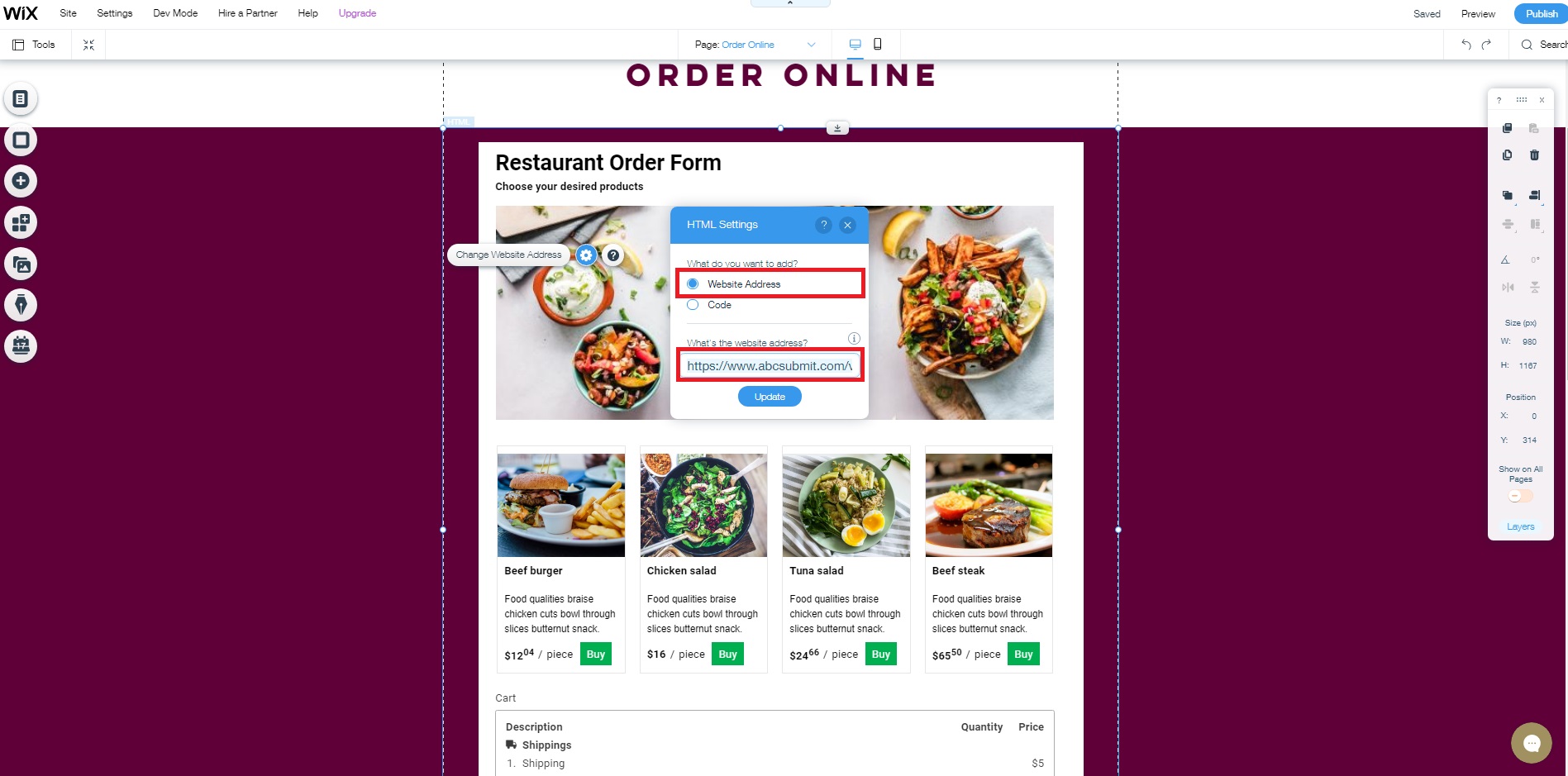
How to add an AbcSubmit form to Wix
Build the form
Start from a template or blank form, add required fields and test conditional paths.
Publish it
Use AbcSubmit’s current publishing options and copy the appropriate share or embed information.
Add it in Wix
Use the current Wix embed functionality supported by your site and insert the published form.
Test the process
Submit on desktop and mobile, then verify confirmation, notifications and downstream actions.
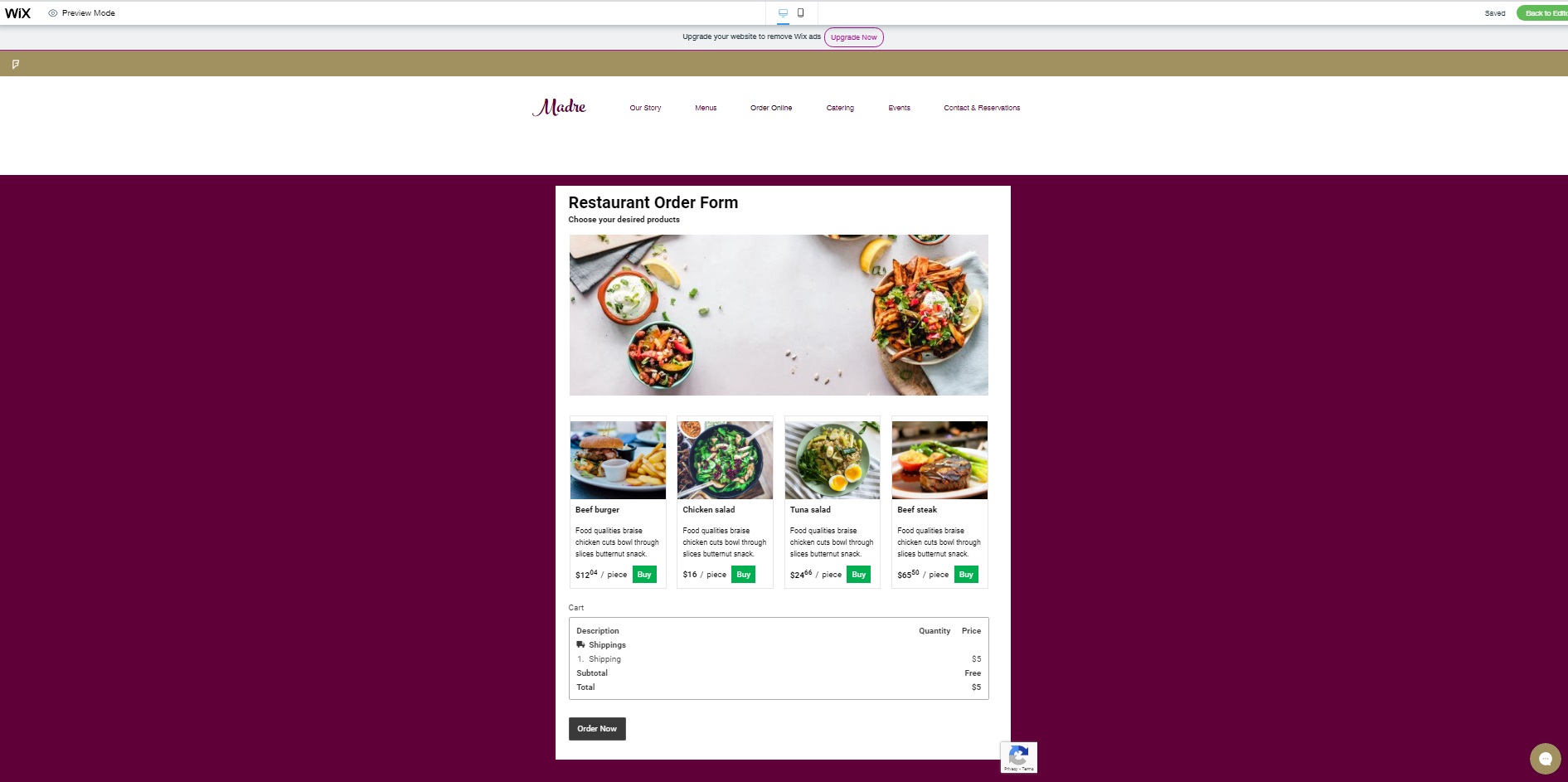
Test the embedded form before launch
- Confirm the form fits the container without horizontal scrolling
- Check all fields and buttons at common mobile widths
- Verify keyboard navigation and visible focus states
- Test validation and every important conditional branch
- Upload a non-sensitive sample file when uploads are used
- Complete the payment or appointment test flow where relevant
- Confirm the success message is visible inside the embed
- Verify customer and internal notifications
- Provide a direct-form fallback link if embedding fails
How to evaluate a free Wix alternative
A free plan is useful for testing, but it should be evaluated against realistic usage. Compare the entire process and ongoing cost—not only the first published page.
| Decision area | What to verify |
|---|---|
| Website requirements | Number of content pages, blog, navigation, domains, design control and SEO settings |
| Form complexity | Fields, conditional rules, calculations, uploads, signatures and save-and-resume needs |
| Submissions | Monthly volume, storage, exports, retention and access controls |
| Payments | Processor, country, currency, account requirements, refunds and transaction fees |
| Automation | Notifications, approvals, branching, edit requests, integrations and failure monitoring |
| Collaboration | Users, roles, permissions, ownership and offboarding |
| Publishing | Hosted links, embeds, mobile behavior and compatibility with your website |
| Total cost | Software plans, domains, apps, payment fees, maintenance and staff time |
AbcSubmit currently lists a Free plan with limits alongside paid cloud and on-premise options. Review the current AbcSubmit pricing and feature matrix. For Wix, use its current official plan page rather than old prices copied into comparison articles.
Migration checklist: Wix forms to AbcSubmit
- Inventory every live Wix form and where it appears
- Record field labels, required status, choices and conditional behavior
- Document notifications, contacts, automations and integrations
- Export data you are authorized to retain before changing systems
- Rebuild one representative form in AbcSubmit
- Map consent, privacy and retention requirements
- Test the form with realistic valid and invalid submissions
- Compare confirmation messages and email delivery
- Embed the new form on a private or test Wix page
- Verify mobile layout, accessibility and analytics
- Replace the production form and monitor early submissions
- Keep a rollback path until the new process is proven
Do not migrate only because a feature list looks longer. A small pilot exposes field, embed and workflow differences before they affect every form.
Use workflow automation after the form submission
AbcSubmit can connect a submitted form to notifications, conditional branches, approvals, request-edit steps and integration actions depending on the selected plan. This is where the product differs most clearly from a basic website form.
Qualify inquiries
Use structured answers to route a lead or request to the appropriate person.
Collect approval
Send internal requests to defined reviewers and keep the decision connected to the submission.
Fix incomplete entries
Request missing or corrected information without losing the context of the original process.
Notify customers
Send relevant updates about acceptance, rejection, scheduling or the next step.
Connect other apps
Move eligible submission data into supported tools through integrations such as Zapier.
Track the process
Review workflow activity and identify requests waiting for a decision or action.
Explore form automation software, multi-step approval workflows, the Zapier integration and workflow templates.
Build forms that convert on a Wix website
- Match the form headline to the Wix page that contains it
- Use one primary call to action near the form
- Explain why sensitive or unusual information is requested
- Break long processes into logical sections
- Use conditional logic to hide irrelevant questions
- Show requirements before file uploads or signatures
- Keep button labels specific, such as “Request my quote”
- Tell users what happens and how long a response normally takes
- Measure completed and qualified submissions, not only page visits
- Review abandonment patterns before adding more fields
Free Wix alternative FAQs
Is AbcSubmit a free alternative to Wix?
AbcSubmit has a Free plan with limits, but it is not a one-to-one Wix replacement. It is a strong alternative for form-centered pages, data collection and workflow automation.
Should I replace my Wix website?
Not necessarily. If your Wix content, design and navigation work well, embed or link an AbcSubmit form where you need more advanced data collection or workflows.
Can I embed AbcSubmit forms on Wix?
Yes, AbcSubmit forms can be published and embedded on compatible websites. Wix changes its editor periodically, so use its current embed tools and test the live page.
Which platform is better for blogging?
Wix is the more appropriate option of the two for a conventional blog and content-rich website. AbcSubmit is focused on forms and business processes.
Can AbcSubmit accept payments?
AbcSubmit’s feature matrix lists Product, Shopping Cart and Payment Processor fields. Availability depends on the selected plan and payment-provider configuration.
Can AbcSubmit automate approvals?
Yes. AbcSubmit lists workflow capabilities including conditional branches, notifications and approval nodes, subject to plan limits and features.
How should I test a Wix-to-AbcSubmit migration?
Rebuild one representative form, embed it on a test page and verify every field, conditional path, notification, integration and mobile state before replacing production forms.
Use the right builder for the process
Build an advanced AbcSubmit form from scratch or a template, then publish it directly or add it to the Wix site your customers already know.